
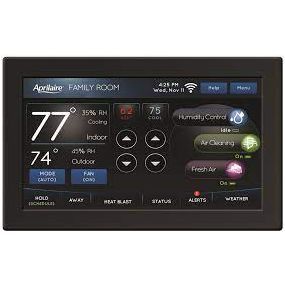


The Anden Aprilaire Color Touchscreen IAQ Thermostat (model 8840) is an Internet-connected precision controller designed to manage all four aspects of indoor air quality — temperature, humidity, air purity, and fresh air — from a single color touchscreen interface. It supports 7-day programming with up to four scheduled events per day, remote monitoring via a mobile app with Wi-Fi smart alerts, and features like Progressive Recovery and Heat Blast that actively manage HVAC equipment to hit scheduled targets. Designed for growers and facility managers who need accurate, automated climate control without leaving the room or the building.
Anden Aprilaire Color Touchscreen IAQ Thermostat Specifications
The 8840 is classified as a Wi-Fi Automation IAQ Thermostat. The specification table below is compiled from manufacturer documentation and the canonical product data supplied at time of listing. The weight figure is drawn from the supplier’s attribute data.
| Specification | Value |
|---|---|
| Brand | Anden / Aprilaire |
| Model Number | 8840 |
| Control Type | Color Touchscreen Wi-Fi IAQ Thermostat |
| Weight | 3.06 lb |
| Connectivity | Wi-Fi with mobile app and smart alerts |
| Programming Schedule | 7-day, up to 4 events per day |
| IAQ Parameters | Temperature, Humidity, Air Purity, Fresh Air |
| Special Features | Progressive Recovery, Heat Blast, Event-Based Air Cleaning, Message Center |
| Remote Sensors | Temperature and humidity remote sensors supported |
| Supplier SKU | DH58840 |
Why Choose the Anden Aprilaire Color Touchscreen IAQ Thermostat
Most thermostats in grow-room and commercial horticulture settings manage temperature alone, or require separate controllers for humidity and ventilation. The Aprilaire 8840 integrates all four IAQ parameters — temperature, humidity, air purity, and fresh air — into a single unit with a color touchscreen that surfaces every control on the home screen. That consolidation reduces the number of devices on the wall, the number of wiring runs to HVAC equipment, and the number of interfaces an operator needs to check during a walk-through.
The 7-day schedule with up to four events per day matches the structure of most grow-room lighting and feeding protocols. Progressive Recovery is a practical feature: instead of waiting until a scheduled event time and then hammering the HVAC system to catch up, the controller activates equipment early so the room is already at the target condition when the event begins. For environments where temperature or humidity overshoot during a transition can stress plants, this matters.
Heat Blast gives operators a way to rapidly raise room temperature in situations where a quick recovery is needed — after a door has been left open, after a reservoir exchange, or at the start of a warm-up phase. The integrated message center surfaces equipment feedback and service reminders on the touchscreen rather than requiring a separate monitoring device, reducing the chance that an alert goes unnoticed.
- Color touchscreen with all IAQ control options visible on the home screen — no submenus required for routine monitoring
- Simultaneous management of temperature, humidity, air purity, and fresh air from one controller
- Progressive Recovery pre-conditions HVAC equipment so target conditions are met at the scheduled event time, not after it
- Heat Blast mode enables rapid temperature recovery when room conditions drop unexpectedly
- Mobile app with Wi-Fi smart alerts allows remote monitoring and condition checks from anywhere, with push notifications when set points are exceeded
- Event-Based Air Cleaning and auto-ventilation tie air quality management to the programming schedule rather than running continuously
- Message center on the touchscreen provides direct equipment feedback and service reminders without a separate monitoring dashboard
Best Uses for the Anden Aprilaire Color Touchscreen IAQ Thermostat
The 8840 is designed for environments where precise, scheduled climate control across multiple parameters is more important than a simple on/off thermostat. The following use cases represent the product’s primary applications based on its feature set and category classification.
- Indoor grow rooms and cultivation facilities: The 7-day programming schedule and multi-parameter IAQ monitoring align directly with grow-room workflows. Growers can schedule temperature and humidity set points for each growth stage — seedling, vegetative, flowering, and flush — without manually adjusting a separate humidity controller each time. The remote sensor support means the controller responds to actual conditions at plant canopy level rather than conditions at the wall unit.
- Commercial HVAC-integrated climate control: The controller is designed to work with existing HVAC equipment, making it a practical upgrade for facilities that have heating and cooling infrastructure already installed. Event-Based Air Cleaning ties fresh air exchanges to the programming schedule, which is useful in facilities where energy costs or odor management make continuous ventilation impractical.
- Multi-zone monitoring with remote access: For operators managing multiple rooms or multiple sites, the mobile app with Wi-Fi smart alerts provides condition checks and alert notifications without requiring a physical walk-through. Remote sensors for temperature and humidity extend the controller’s awareness beyond the wall-mount location, giving a more accurate picture of actual room conditions. Pairing this controller with an advanced lighting controller allows growers to synchronize climate and lighting schedules from separate devices tuned to each domain.
- Facilities requiring service tracking: The message center and service reminder features make the 8840 useful in operations where HVAC maintenance intervals are tracked and equipment feedback needs to be surfaced to staff on the floor, not just to a remote monitoring system.
Compatibility
The Aprilaire 8840 is designed to work with standard HVAC equipment that accepts thermostat-level control signals. The following compatibility notes are drawn from the canonical product description and category context. Operators should verify terminal compatibility with their specific HVAC equipment before installation.
- HVAC equipment: The controller is designed to activate and coordinate HVAC equipment including heating, cooling, ventilation, and humidity-control devices. Progressive Recovery requires compatible equipment that can accept early-start signals from the thermostat; confirm this with your HVAC equipment documentation.
- Remote sensors: The 8840 supports remote temperature and humidity sensors, which extend monitoring beyond the wall-mount location. Remote sensor compatibility allows for accurate control based on conditions at the plant canopy or in the center of a large room rather than at the thermostat itself.
- Wi-Fi and mobile app: The controller connects via standard Wi-Fi for mobile app access and smart alert delivery. A stable 2.4 GHz Wi-Fi connection in the installation area is required for full remote-monitoring functionality.
- Dehumidification and air cleaning equipment: The Event-Based Air Cleaning and auto-ventilation features require compatible air cleaning or fresh-air exchange equipment connected to the controller. Growers using standalone dehumidifiers alongside this controller — such as the condensate pump accessories that support Pro Series dehumidifiers — should plan the control wiring to avoid conflicts between the thermostat’s humidity output and any stand-alone dehumidifier controls.
Usage Guidelines
The 8840 is intended for continuous 24/7 operation. The following guidelines describe how to use its core features effectively once installation is complete.
Programming the schedule: The 7-day schedule supports up to four events per day. For grow-room use, each event period can correspond to a distinct growth-phase condition set — for example, a lights-on daytime set point for temperature and humidity, a lights-off nighttime set point, and transition ramp periods. Use the touchscreen to enter set points for temperature and humidity for each event period in each day’s schedule.
Progressive Recovery: This feature is enabled in settings and works automatically once programmed. The controller calculates how far in advance to start HVAC equipment so that conditions reach the set point by the scheduled event start time. Verify that your HVAC equipment responds correctly to early-start signals during the first full programming cycle.
Heat Blast: Activate Heat Blast via the touchscreen when a rapid temperature increase is needed. This mode commands heating equipment to run at capacity until the target temperature is reached. It is intended for recovery situations, not routine scheduling, and should be used only when the room temperature has dropped significantly from the set point.
Remote monitoring via mobile app: Download the companion app and connect the thermostat to the facility’s Wi-Fi network during setup. Configure smart alert thresholds for temperature and humidity so that the app sends notifications when conditions deviate from the programmed set points. Regularly verify that the app is receiving data from the controller, particularly after power outages or Wi-Fi interruptions.
Remote sensors: Mount temperature and humidity remote sensors at plant canopy height or at the location in the room most representative of the conditions you want to control. Verify that sensor readings on the touchscreen home screen align with spot-check measurements from a calibrated reference device during initial commissioning. For additional spot-check tools, a standalone circulation fan improves air mixing across the room, which helps remote sensors read conditions that are more representative of the overall environment rather than a single stagnant zone.
Message center and service reminders: Review the message center on the touchscreen home screen regularly. The controller surfaces equipment feedback and service reminders directly on-screen. Respond to service reminders promptly to avoid equipment degradation that can affect IAQ control accuracy.
How to Install / Setup the Anden Aprilaire Color Touchscreen IAQ Thermostat
Installation of the 8840 involves wall mounting, low-voltage wiring to HVAC equipment, Wi-Fi connection, and initial programming. The steps below represent a general installation sequence for this category of IAQ thermostat; always follow the manufacturer’s installation guide included with the unit, and consult a licensed HVAC technician if you are not comfortable with low-voltage thermostat wiring.
- Power off HVAC equipment: Before disconnecting any existing thermostat or running new wiring, turn off power to all HVAC equipment at the circuit breaker. This prevents shorts or equipment damage during wiring.
- Remove the existing thermostat (if applicable): Label each wire with the terminal identifier (R, C, G, W, Y, etc.) before disconnecting. Take a photo of the existing wiring arrangement for reference. Note whether a C-wire (common wire) is present, as the 8840 requires a C-wire for continuous power to support Wi-Fi and the color touchscreen.
- Mount the wall plate: Attach the thermostat wall plate to a standard electrical box or directly to the wall at a location that is representative of room conditions — away from direct sunlight, drafts, supply air registers, and heat sources that could cause inaccurate local readings. Use a level to ensure the plate is straight.
- Connect the low-voltage wiring: Connect each labeled wire from the HVAC system to the corresponding terminal on the thermostat wall plate per the wiring diagram in the manufacturer’s installation guide. Verify that the C-wire is connected to the C terminal for reliable power. If no C-wire is present, consult the installation guide for alternative power options.
- Attach the thermostat body to the wall plate: Snap or screw the 8840 unit onto the installed wall plate. Restore power to the HVAC equipment at the circuit breaker and verify that the color touchscreen powers on.
- Connect to Wi-Fi: Follow the on-screen setup wizard to connect the thermostat to the facility’s Wi-Fi network. Download the companion mobile app on a smartphone or tablet and pair the app with the thermostat using the credentials or pairing code displayed on-screen.
- Install remote sensors (if applicable): Place temperature and humidity remote sensors at the desired monitoring locations in the room. Follow the manufacturer’s pairing instructions to register sensors to the 8840. Verify that sensor readings appear on the thermostat home screen.
- Enter the programming schedule: Use the touchscreen to enter the 7-day schedule with up to four events per day. Set temperature and humidity set points for each event period to match the conditions required for each growth stage or operational period. Enable Progressive Recovery in settings if your HVAC equipment supports it.
- Verify operation: Allow the controller to run through at least one full programming cycle and monitor that HVAC equipment responds correctly to scheduled set point changes. Check the message center for any equipment feedback or error codes and resolve them before leaving the installation unattended.
Sources & Further Reading
| Weight | 3.06 lbs |
|---|---|
| Brand | Anden |
Be the first to review “Anden Aprilaire Color Touchscreen IAQ Thermostat”
Related products


Environmental Controllers & Timers
Titan Controls Apollo 6 – One Outlet Mechanical Timer (10/Cs)


CO₂ (Burners, Bags, Tanks, Controllers)

CO₂ (Burners, Bags, Tanks, Controllers)
Titan Controls Atlas 8 – Digital CO2 Controller w/ Fuzzy Logic


CO₂ (Burners, Bags, Tanks, Controllers)


CO₂ (Burners, Bags, Tanks, Controllers)
Autopilot Natural Gas CO2 Generators – 10 Burner 27,670 BTU 27.7 CU Ft/Hr

Environmental Controllers & Timers

CO₂ (Burners, Bags, Tanks, Controllers)


Environmental Controllers & Timers
Reviews
There are no reviews yet.