


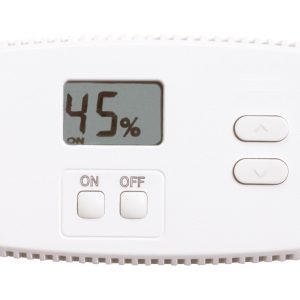
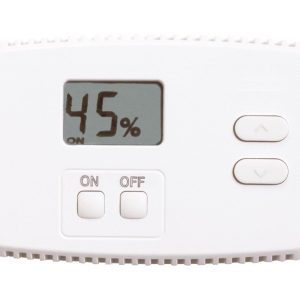


The Anden Model A76 Digital Dehumidifier Control is a hardwired remote control unit designed to work with all Anden dehumidifiers. It uses an onboard relative humidity sensor to continuously monitor conditions in its installed location, displaying current RH on a digital readout. The A76 lets you set a target humidity level and operate your dehumidifier from a more accessible or convenient spot — useful when the dehumidifier itself is mounted in a hard-to-reach area of a grow room or mechanical space.
Anden A76 Digital Dehumidifier Control Specifications
The A76 is a compact wired accessory in Anden’s dehumidifier control line. Specifications below are derived from the manufacturer’s product documentation and supplier catalog listing for SKU DH20076.
| Specification | Value |
|---|---|
| Model | A76 |
| SKU / Part Number | DH20076 |
| Control Type | Wired (hardwired connection to dehumidifier) |
| Sensor Type | Onboard relative humidity (RH) sensor |
| Display | Digital readout showing measured relative humidity |
| Compatible With | All Anden dehumidifier models |
| Brand | Anden |
| GTIN-12 | 686720007668 |
Why Choose the Anden A76 Digital Dehumidifier Control
Grow rooms and mechanical spaces often require dehumidifiers to be installed in locations that are inconvenient to access directly — mounted high on a wall, tucked into a corner, or behind equipment. The A76 addresses this by moving the humidity setpoint controls and sensor readout to wherever you actually need them.
- Remote humidity management: The A76 communicates directly with your Anden dehumidifier, so you can set the target relative humidity level and start or stop the unit without physically reaching the dehumidifier itself.
- Sensor placed where it matters: Because the onboard sensor reads RH at the control unit’s location rather than at the dehumidifier, you can position the A76 at canopy height or another representative spot in your grow space for more accurate readings.
- Digital display for at-a-glance monitoring: The built-in digital readout shows current relative humidity continuously, giving you a quick status check without needing a separate hygrometer at the unit’s location.
- Compatible with all Anden dehumidifiers: Whether you’re running an Anden whole-room unit or a ceiling-mount model, the A76 is designed to work across the full Anden dehumidifier lineup, making it a versatile control option as your setup grows or changes.
- Designed for permanent installation: The hardwired connection is suited to fixed grow room installations where you want reliable, always-on communication between the control interface and the dehumidifier rather than a wireless link that depends on battery or signal strength.
Best Uses for the Anden A76 Digital Dehumidifier Control
The A76 fits a specific operational need: situations where the dehumidifier is not conveniently accessible but reliable humidity control is still required. The following scenarios reflect the use cases described in the product’s documentation.
- Hard-to-reach dehumidifier placements: Ceiling-mounted or wall-mounted Anden dehumidifiers in large grow tents or commercial rooms are often out of reach for routine adjustments. The A76 allows setpoint changes from a convenient working position without ladders or climbing.
- Separated control and monitoring zones: Some growers prefer to monitor and control climate from a dedicated control area or adjacent workspace rather than inside the grow environment itself. The A76 can be mounted in that space and communicates back to the dehumidifier via the hardwired connection.
- Canopy-level humidity sensing: Placing the A76 at canopy height lets the sensor capture the humidity environment where plants are actually transpiring, rather than relying on a reading from wherever the dehumidifier happens to be installed.
- Multi-room or partitioned grow spaces: When a single Anden dehumidifier serves a room that has been divided or partially partitioned, mounting the A76 control in the zone you want to prioritize for humidity control gives you more representative data for that specific area.
- Facilities with dedicated equipment rooms: In commercial-scale operations where dehumidifiers are kept in a mechanical room separate from the cultivation floor, the A76 enables operators to monitor and adjust settings from the cultivation side without entering the mechanical space.
Anden A76 vs Similar Dehumidifier Controls
The A76 occupies a specific niche among dehumidifier control options. Understanding how it compares to other approaches helps you decide whether it’s the right fit for your setup.
A76 vs standalone external humidistat: A generic plug-in humidistat can control dehumidifier operation by cycling power on and off, but it cannot communicate with the dehumidifier’s internal logic or relay setpoint data to the unit. The A76 uses a direct communication link to the Anden dehumidifier, which means the dehumidifier receives actual RH setpoint data rather than just an on/off signal. This approach preserves the dehumidifier’s built-in control features rather than bypassing them.
A76 vs wireless humidity controllers: Environmental controllers such as the Autopilot PX2 controller offer broader climate management including lighting and CO2, but they control devices through outlet switching rather than direct communication protocols. The A76 is purpose-built for Anden dehumidifiers and provides a tighter integration, though it does not manage other climate equipment.
A76 vs Anden’s other remote control options: Anden offers additional control accessories (such as the A77) for specific dehumidifier models or use cases. The A76 is positioned as the universal option compatible with all Anden dehumidifiers, making it the practical choice if you have multiple Anden units or expect to upgrade your dehumidifier in the future without changing your control setup.
A76 vs no remote control: For growers who currently walk to the dehumidifier to check the onboard display and adjust settings, the A76 eliminates that friction. Given that optimal humidity management in flowering stages requires frequent monitoring and adjustment, the convenience factor has practical value for yield consistency.
Compatibility
The Anden A76 is designed to work with all Anden dehumidifier models. Because it communicates over a wired connection using Anden’s proprietary control interface, it is not compatible with dehumidifiers from other manufacturers. Before purchasing, verify that your specific Anden dehumidifier model supports the A76 control connection by consulting the dehumidifier’s documentation or contacting Anden directly.
The A76 must be hardwired to the dehumidifier — it is not a plug-and-play wireless accessory. Wiring should be performed in accordance with local electrical codes and the dehumidifier’s installation manual. If your dehumidifier is already installed and wired, a qualified electrician or HVAC technician can add the A76 control connection as a secondary wiring run.
For growers running a broader climate control setup, the A76 handles only dehumidifier setpoint and monitoring. Temperature control, ventilation, and CO2 management require separate controllers. You may want to pair the A76 with a dedicated condensate pump if your Anden dehumidifier requires continuous drainage in a location without floor drain access.
Usage Guidelines
Using the A76 effectively requires understanding how its sensor placement affects the readings that drive your dehumidifier’s operation. The following guidelines reflect standard practices for hardwired dehumidifier controls in grow environments.
Sensor placement: Mount the A76 in the area where accurate humidity readings matter most. For most grow rooms, canopy height in the primary cultivation zone is appropriate. Avoid placing the control unit near air intake vents, directly under a fan, or in a spot that receives direct airflow from the dehumidifier outlet — these locations can give unrepresentative readings that cause the dehumidifier to cycle incorrectly.
Setting the target RH: Use the A76’s digital interface to enter your target relative humidity setpoint. The dehumidifier will run until the sensor at the A76’s location reads at or below that setpoint. Common target ranges vary by growth stage: vegetative growth typically runs 50–70% RH, while late flowering stages often target 40–50% RH to reduce mold and mildew risk. Adjust setpoints gradually (5% increments) rather than making large sudden changes.
Monitoring the display: Check the digital readout periodically to confirm that actual RH in the grow space is tracking your setpoints. A large persistent gap between target and measured RH may indicate that the dehumidifier’s capacity is undersized for the space, that the space has an unaddressed moisture source, or that the A76 sensor or wiring connection requires attention.
Working alongside other humidity management tools: Some growers use Boveda 2-way humidity packs for smaller enclosed spaces or drying/curing areas where a full dehumidifier is not appropriate. The A76 is intended for larger-scale grow room dehumidification rather than small-container humidity buffering.
How to Install the Anden A76 Digital Dehumidifier Control
Installation requires hardwiring the A76 to your Anden dehumidifier. The steps below outline the general process; always follow your specific dehumidifier model’s installation manual and applicable local electrical codes.
- Power down the dehumidifier completely before beginning any wiring work. Disconnect the unit from its power source and confirm with a non-contact voltage tester that the circuit is de-energized.
- Select the mounting location for the A76 control unit. Choose a spot that is representative of the humidity conditions you want to manage — canopy height in the main grow zone is typical. The location should be accessible for routine monitoring and setpoint adjustments.
- Run the control wiring from the A76 mounting location to the dehumidifier. Route the cable in a way that protects it from physical damage, moisture exposure, and foot traffic. Secure with cable clips or conduit as appropriate for your installation.
- Connect the wiring to the dehumidifier’s control port following the wiring diagram in the Anden dehumidifier’s installation manual. The A76 uses a specific communication connection — refer to both the A76 and dehumidifier documentation to ensure correct terminal identification and polarity.
- Mount the A76 unit at the selected location using the hardware appropriate for your wall or surface type. Ensure the control is level and secure.
- Restore power to the dehumidifier and confirm that the A76’s digital display powers on and shows a relative humidity reading. Verify that the dehumidifier responds to setpoint changes made at the A76 control interface.
- Set your initial humidity target using the A76’s controls. Monitor the system for the first few hours to confirm correct operation before leaving it unattended.
Sources & Further Reading
- Anden — Official Brand Site (anden.com) — Product documentation, dehumidifier compatibility guides, and technical support resources for all Anden control accessories including the Model A76.
| Weight | 0.5 lbs |
|---|---|
| Dimensions | 2.31 × 5.63 × 4.38 in |
Be the first to review “Anden Digital Dehumidifier Control (For All Anden Dehumidifiers)”
Related products

CO₂ (Burners, Bags, Tanks, Controllers)

CO₂ (Burners, Bags, Tanks, Controllers)


Environmental Controllers & Timers
Titan Controls Apollo 6 – One Outlet Mechanical Timer (10/Cs)

CO₂ (Burners, Bags, Tanks, Controllers)
Titan Controls Ares Series Replacement CO2 Generator AC Power Supply


Environmental Controllers & Timers


Environmental Controllers & Timers

Environmental Controllers & Timers


Environmental Controllers & Timers
Reviews
There are no reviews yet.