


The Bluelab pH Pen is a handheld, waterproof pH and temperature meter designed for growers who need quick, reliable readings without a bulky bench setup. It measures pH and temperature in a compact form, with automatic temperature compensation ensuring accuracy across varying solution conditions. A 30-day calibration indicator keeps your readings trustworthy between calibration sessions.
Bluelab pH Pen Specifications
Physical and functional specifications sourced from the canonical product data and manufacturer documentation.
| Specification | Value |
|---|---|
| Measurement Parameters | pH and temperature |
| Temperature Units | Selectable (°C / °F) |
| Temperature Compensation | Automatic (ATC) |
| Calibration | Two-point; 30-day calibration indicator |
| Probe Type | Double-junction (not replaceable) |
| Display | Backlit LCD |
| Water Resistance | Fully waterproof |
| Hold Function | Yes |
| Auto-Off | Yes |
| Low Battery Indicator | Yes |
| Battery | AAA (included) |
| Length | 8.19 in |
| Width | 2.75 in |
| Height | 2.13 in |
| Weight | 0.4 lb |
| Brand | Bluelab |
| SKU | BLBPENPH |
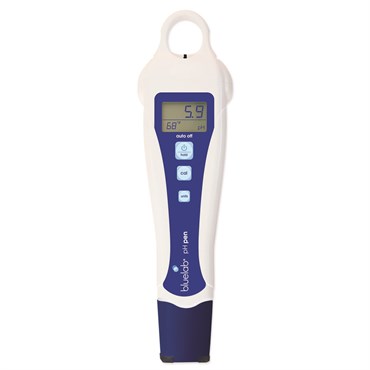
Why Choose the Bluelab pH Pen
The Bluelab pH Pen is built for growers who need accurate, repeatable pH readings without the setup time of a bench meter. Here is what sets it apart from generic pH testers:
- Fully waterproof construction: The pen can be rinsed clean or used in wet growing environments without risk of damage. This matters in hydroponic and aquaponic setups where splashing is routine.
- Automatic temperature compensation (ATC): pH readings shift with solution temperature. The Bluelab pH Pen adjusts for temperature in real time, so you get an accurate reading whether your reservoir is at 65°F or 75°F without manual correction.
- 30-day calibration indicator: The pen tracks when you last calibrated and flags when it’s time to recalibrate. This removes the guesswork and helps you maintain data integrity over a full growing cycle.
- Double-junction probe: Double-junction pH probes are more resistant to contamination from nutrient solutions than single-junction designs. The junction separates the reference electrolyte from the sample, reducing drift and extending the usable life of the probe.
- Two-point calibration: Calibrating at two points (typically pH 4.0 and pH 7.0) spans the measurement range relevant to hydroponics and soil growing, providing better accuracy across the working range than single-point calibration.
- Hold function and backlit display: Freeze the reading on-screen while you move the pen away from the reservoir. The backlit LCD stays readable in low-light grow rooms.
- Compact and self-contained: A single AAA battery powers the unit. Auto-off extends battery life when the pen is set down between checks. No cables, no external probes to connect.
Best Uses for the Bluelab pH Pen
This pen is a practical fit for a range of growing applications where regular pH monitoring is part of the routine.
- Hydroponic reservoir management: Check the pH of your nutrient solution before and after adjustments. The hold function lets you take the reading away from the reservoir to view it clearly without bending over a tank. Pairing this with an EC calibration kit for a companion EC meter covers the two most important water chemistry parameters in a hydro system.
- Soil and coco grows: Measure the pH of runoff water or a slurry test to assess root-zone pH. Knowing the pH of your runoff helps you identify whether nutrients are locking out before visible symptoms appear.
- Aquaponics and DWC systems: Fully waterproof construction means the pen can be rinsed between readings or briefly submerged without damage. This is practical when testing multiple Deep Water Culture (DWC) buckets in sequence.
- Water source testing: Test your tap or RO water before mixing nutrients. If you’re using a reverse osmosis system, confirm the output pH before building your nutrient solution — RO water can have variable pH depending on membrane condition and source water chemistry.
- pH adjustment verification: After adding pH Up or pH Down, re-test to confirm the solution has reached target range. The pen’s fast response time makes this a quick check rather than a waiting exercise.
- Small-scale and home grows: For a grower running one or two tents or a small indoor garden, a handheld pen covers all pH testing needs without the cost of a continuous-monitoring system.
Bluelab pH Pen vs Similar pH Meters
The Bluelab pH Pen occupies the mid-range of the handheld pH pen market. Here is how it compares to the broader category of similar instruments:
vs. budget pH pens (under $30): Lower-cost pH pens typically use single-junction probes and lack automatic temperature compensation. They calibrate at one point and do not track calibration age. For occasional testing in a low-stakes context they may be adequate, but in a production hydroponic grow where pH drift directly affects yield, the lack of ATC and the shorter probe lifespan are meaningful trade-offs. The Bluelab pen’s double-junction probe and ATC address both of those gaps.
vs. benchtop pH meters: A benchtop meter with a replaceable probe can offer longer total service life, since you can swap the electrode rather than replace the whole unit when the probe ages out. However, a benchtop meter requires a power outlet, takes more space, and is not practical for checking multiple locations in a grow facility quickly. The Bluelab pH Pen trades replaceable-probe longevity for portability and ease of use in a wet environment.
vs. continuous pH monitors: Inline or continuous-monitoring pH controllers provide real-time data and can trigger dosing pumps automatically. They are appropriate for automated systems or large-scale operations. The Bluelab pH Pen is a manual, spot-check instrument — it does not connect to a controller or log data. For growers who check pH once or twice per day by hand, the pen approach keeps the workflow simple and the cost down.
Note on probe replacement: The Bluelab pH Pen’s double-junction probe is not field-replaceable. When the probe reaches end-of-life (typically indicated by sluggish response, inability to hold calibration, or erratic readings), the unit should be replaced. This is a common trade-off in pen-style meters at this price point.
Compatibility
The Bluelab pH Pen is a standalone, battery-powered instrument and does not require an external power source or data connection. It is compatible with any aqueous solution within its measurement range — nutrient solutions, reservoir water, tap water, runoff samples, and slurry tests. The pen is not designed for non-aqueous solutions or gases.
Temperature compensation operates automatically. No manual temperature entry is required. Selectable temperature units (Celsius or Fahrenheit) allow the display to match the preference of the grower.
The pen works alongside any brand of pH calibration solution. Bluelab recommends using fresh calibration solution at pH 4.0 and pH 7.0 for two-point calibration. Using calibration solutions outside their labeled expiry date can introduce calibration error — this applies to any pH meter, not just this model.
The unit operates on a single AAA battery, which is included. Replacement AAA batteries are available from any standard retailer. No proprietary battery or charging system is required.
For growers who also need EC and TDS readings, the Bluelab pH Pen covers only pH and temperature. A separate EC/TDS pen would be needed for conductivity testing. See the Apera GroStar EC electrode category for companion instruments if you are building out a water-testing kit.
Usage Guidelines
Follow these steps each time you use the Bluelab pH Pen to get consistent, accurate readings:
- Rinse the probe before measuring. Use clean water (RO or distilled preferred) to rinse the probe tip before dipping it into a sample. This removes any residue from the previous measurement or storage solution.
- Submerge only the probe tip. Dip the probe tip into the solution — do not submerge the entire pen body beyond the probe, even though the unit is waterproof. Swirl gently to ensure the probe contacts fresh solution.
- Wait for the reading to stabilize. pH readings from a glass electrode take several seconds to equilibrate. Watch the display and wait until the number stops changing before recording the value. Use the hold function to freeze the reading.
- Rinse after each measurement. Rinse the probe tip with clean water after each sample. If moving between very different solutions (e.g., from pH 4 calibration solution to a reservoir at pH 6), rinse thoroughly to avoid cross-contamination.
- Calibrate on schedule. The 30-day calibration indicator will alert you when calibration is due. Calibrate more frequently if you are testing many samples per day or if readings seem inconsistent. Use fresh pH 4.0 and pH 7.0 calibration solutions for two-point calibration.
- Store the pen correctly. When not in use, keep the probe tip moist. Many growers place a small amount of storage solution or pH 7.0 calibration solution in the probe cap. Storing a pH electrode dry shortens its usable life.
- Monitor the battery indicator. The low battery indicator will appear on the LCD when the battery is getting low. Replace the AAA battery promptly — a weak battery can affect reading stability.
Target pH ranges for common growing methods: hydroponics 5.5–6.5 (most crops); soil 6.0–7.0; coco coir 5.5–6.5. Consult your nutrient manufacturer’s guidelines for crop-specific targets within these ranges.
How to Calibrate the Bluelab pH Pen
The Bluelab pH Pen uses a two-point calibration process. Calibration should be performed before first use and repeated at least every 30 days, or whenever the calibration indicator prompts you. Use fresh, unexpired pH 4.0 and pH 7.0 buffer solutions.
- Prepare your calibration solutions. Pour a small amount of pH 4.0 buffer and pH 7.0 buffer into separate clean containers. Do not use buffer solution directly from the bottle — contamination can degrade the remaining solution.
- Power on the pen. Turn the unit on and allow it to reach operating mode. Rinse the probe tip with clean water and dry lightly.
- Begin calibration mode. Follow the Bluelab pH Pen’s button sequence to enter calibration mode. Refer to the included instruction card for the exact button press sequence for this model.
- Calibrate at pH 7.0 first. Submerge the probe tip in the pH 7.0 buffer solution. Allow the reading to stabilize. Confirm or accept the calibration point as directed by the display.
- Calibrate at pH 4.0. Rinse the probe tip with clean water, then submerge in the pH 4.0 buffer. Allow the reading to stabilize. Confirm or accept the second calibration point.
- Confirm calibration is saved. The pen will indicate when calibration is complete. The 30-day calibration timer resets at this point.
- Rinse the probe. Rinse the probe with clean water before returning to normal use or placing in storage solution.
If the pen fails to calibrate — for example, if it cannot reach the target buffer value within the allowed range — the probe may be near end of life or the calibration solutions may be expired or contaminated. Try fresh buffer solutions first before concluding the probe has failed.
Sources & Further Reading
| Weight | 0.4 lbs |
|---|---|
| Dimensions | 2.13 × 2.75 × 8.19 in |
| Brand | Bluelab |
Be the first to review “Bluelab pH Pen”
Related products

pH / EC / TDS Meters & Solutions


pH / EC / TDS Meters & Solutions

pH / EC / TDS Meters & Solutions

pH / EC / TDS Meters & Solutions


pH / EC / TDS Meters & Solutions


pH / EC / TDS Meters & Solutions

pH / EC / TDS Meters & Solutions

pH / EC / TDS Meters & Solutions
Reviews
There are no reviews yet.